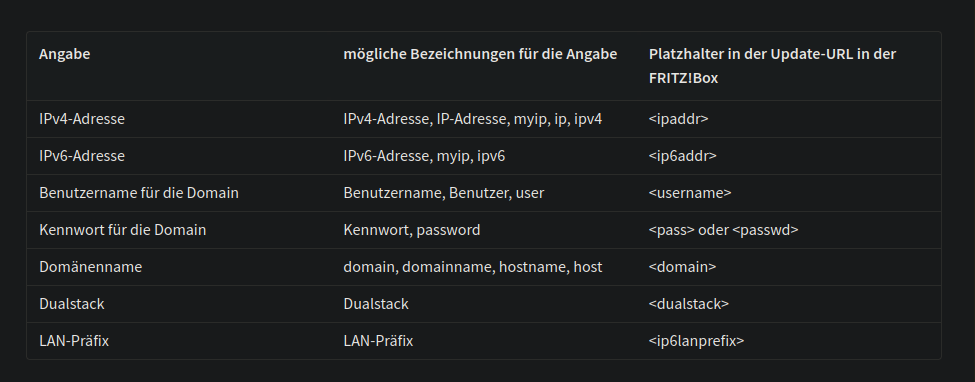
Use backticks to display the characters as code like this: <>. The URL template you posted should not be interpreted as a link on this forum anyway as it only works in the context of the FRITZ!OS DynDNS client.
What you don’t get this way is a DNS record for the IPv6 address of the router itself. You get the A record for the router and 1 AAAA record for a host on the LAN. And for IPv6-only connections (e.g. on DS-Lite) you would only get the AAAA record for the LAN host and nothing for your router. Still, for many simple use cases this may be a good solution.
Note: since the same hostname has an A record pointing to the router and an AAAA record pointing to a LAN host, there might be some ambiguity as to which node a client connects to when using the hostname. This can be mitigated by using different ports.
That’s often what people want, because they’re trying to get access to some kind of server in the LAN. A combination of the public IPv4 address assigned to the router (forwarded by the router to the server), and the IPv6 address of the server is how to do that. Often that server runs a reverse proxy, so that several portless URLs for different services can be used over the single public IPv4 address. If they also want access to their router, they can enable router access via the server.
@GenericUser Sure. I just wanted to mention it to make sure nobody gets surprised by this. I have seen situations in the past, where A and AAAA records for the same name pointing to different hosts caused some confusion.
It really was a trial-and-error for me. My Problem was, that my router doesn’t have an IPv4 I can forward to. How a friend described it to me: I get my connection via a NAT, this one listens to the signal in my street and routes my packages to my house. So just my “street” has an IPv4. Please correct me, if i am wrong.
Correct. The public IPv6 address, or in the case of a LAN host probably the public IPv6 prefix, is only allocated to your Internet connection. So any DNS records referencing these addresses will work, because packets sent to these addresses will be routed to your router.
For IPv4 the CGNAT will also use some public IPv4 address (shared with other users) towards the Internet. This will work for outgoing connections because the CGNAT will associate the replies to the connections. But you can’t configure the provider’s NAT to accept incoming connections and forward them to your router.
No.
I have no idea what use this parameter could have? You’d need to ask AVM what use-case they had in mind when adding this placeholder. It isn’t even documented what value is substituted for this placeholder. Is this a boolean? If so what are the values for true/false? The deSEC IP Update API does not support any such value. And I have not seen any other DDNS services support such a value either.
Also Dualstack ≠ DS-Lite. In fact if your connection is Dualstack I’d expect it to have public IPv4 and IPv6 addresses allocated only to your Internet connection. Kind of the opposite of DS-Lite.
And the problem here is not DNS. It is the fact that incoming IPv4 connections will not be routed to your router.
You can use a Dualstack configuration with private (RFC1918 or RFC 6598) IPv4 addresses and CGNAT. Several internet providers do precisely that. DS-Lite is a specific protocol (RFC6333) which uses CGNAT, but it’s not the only one. DS-Lite is not synonymous with private addresses and CGNAT.
A connection with CGNAT needs some sort of relay on the internet to be reachable from IPv4-only hosts. Unless such a relay is configured, it is best not to use an A record with dynamic DNS, as connections to the “public” Ipv4 address will time out, causing an unnecessary delay.