For Nextcloud AIO, I wanted to install HAProxy @ OPNsense as a reverse proxy with a wildcard certificate from Let’s Encrypt and “SUBDOMAIN.dedyn.io” from deSEC. The procedure is similar to the tutorial, adapting to the current fields and settings:
A) Plugin installation
- OPNsense currently with OpenSSL
- os-acme-client, os-ddclient, and os-haproxy are installed
B) DynDNS configuration
-
Account created in desec.io
-
SUBDOMAIN.dedyn.io created
-
Token created
-
TOKEN
-
CAA record with 0, issuewild, “letsencrypt.org”, 3600
-
The following error occurs when creating the CNAME:
RRset with conflicting type present: database (CAA, NS).
(No other RRsets are allowed alongside CNAME.)
The documentation says:
A CNAME record is not allowed when other records exist at the same subname.
This is a limitation of the DNS specification.
Retrieving and Creating DNS Records — deSEC DNS API documentation -
Services > Dynamic DNS > Settings > General Settings > Enabled, Interval: 300, Backend: Native
-
Services > Dynamic DNS > Settings > Accounts >
- Service: desec-v4 or Custom
- Protocol: n/a or DynDNS 2
- Server: n/a or update.dedyn.io
- Username: SUBDOMAIN.dedyn.io
- Password: TOKEN
- Wildcard: No
- Hostname: SUBDOMAIN.dedyn.io
- IP Check Method: Interface [IPv4]
- Interface to Monitor: WAN
- IP Check Timeout: 10
- Enforce SSL: Yes
- Interfaces > Diagnostics > Ping > Hostname or IP: SUBDOMAIN.dedyn.io, Address Family: IPv4, Source Address: EMPTY, Packet size: EMPTY, Do not fragment: No
=> Loss: 100%, Error: sendto: Host is down
Record Sets SUBDOMAIN.dedyn.io are:
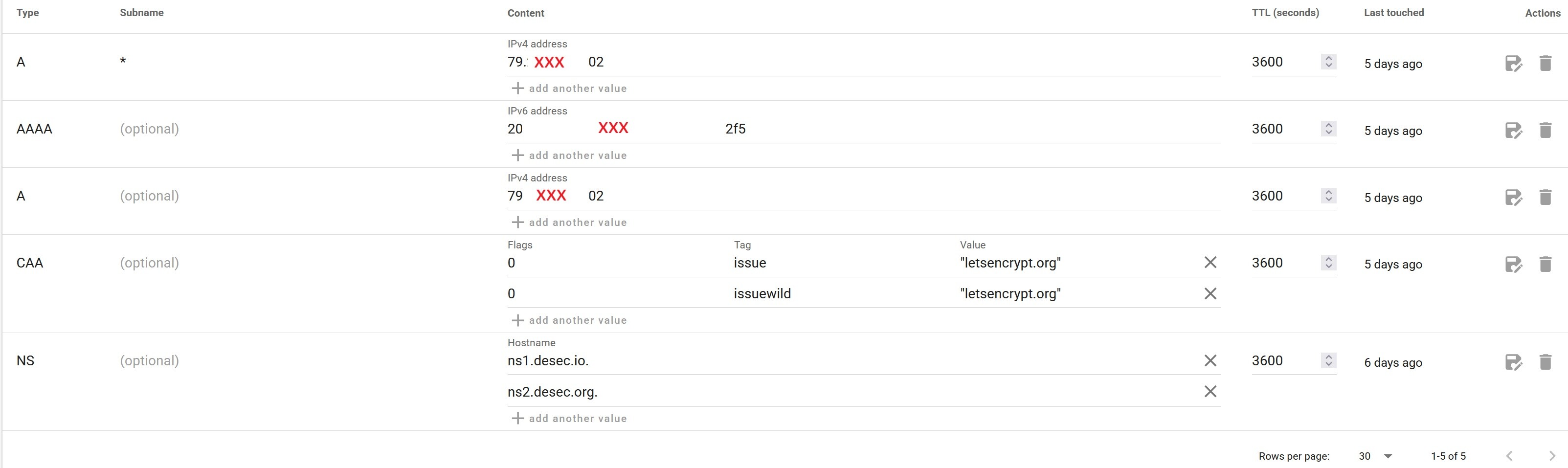
I am trying to create a single wildcard CNAME record “*.SUBDOMAIN.dedyn.io” for all my services. With the latter “any_string.SUBDOMAIN.dedyn.io” should resolve to the IP of “SUBDOMAIN.dedyn.io”.
I didn’t get how to achieve that and after founding no soution, I tried to configure HAProxy, but it still - presumably - resulted in the same error.
- Could I please get some advice on what I need to configure instead of CAA + CNAME for deSEC, or what I can read up on if CNAME can only be entered alone?
Below is my configuration (anonymized), protocol, and topology.
Thank you & kind regards,
Rico
Services: HAProxy: Configuration Export (anonymized):
[pre]#
# Automatically generated configuration.
# Do not edit this file manually.
#
global
    uid                         80
    gid                         80
    chroot                      /var/haproxy
    daemon
    stats                       socket /var/run/haproxy.socket group proxy mode 775 level admin
    nbthread                    6
    hard-stop-after             60s
    no strict-limits
    maxconn                     10000
    ocsp-update.mindelay 300
    ocsp-update.maxdelay 3600
    httpclient.resolvers.prefer   ipv4
    tune.ssl.default-dh-param   4096
    spread-checks               2
    tune.bufsize                16384
    tune.lua.maxmem             0
    log                         /var/run/log local0 info
    lua-prepend-path            /tmp/haproxy/lua/?.lua
defaults
    log     global
    option redispatch -1
    maxconn 5000
    timeout client 30s
    timeout connect 30s
    timeout server 30s
    retries 3
    default-server init-addr last,libc
    default-server maxconn 50000
# autogenerated entries for ACLs
# autogenerated entries for config in backends/frontends
# autogenerated entries for stats
# Frontend: 0_SNI_frontend (Listening on 0.0.0.0:80, 0.0.0.0:443)
frontend 0_SNI_frontend
    bind 0.0.0.0:443 name 0.0.0.0:443
    bind 0.0.0.0:80 name 0.0.0.0:80
    mode tcp
    default_backend SSL_backend
    # logging options
# Frontend: 1_HTTP_frontend (Listening on 127.4.4.3:80)
frontend 1_HTTP_frontend
    bind 127.4.4.3:80 name 127.4.4.3:80 accept-proxy
    mode http
    option http-keep-alive
    default_backend Fallback_Backend
    # logging options
    # ACL: NoSSL_condition
    acl acl_74z5hhgd42d038.47994567 ssl_fc
    # ACTION: HTTPtoHTTPS_rule
    http-request redirect scheme https code 301 if !acl_74z5hhgd42d038.47994567
# Frontend: 1_HTTPS_frontend (Listening on 127.4.4.3:443)
frontend 1_HTTPS_frontend
    http-response set-header Strict-Transport-Security "max-age=6307200; includeSubDomains; preload"
    bind 192.168.50.1:443 name 192.168.50.1:443 accept-proxy ssl curves secp384r1  ssl-min-ver TLSv1.3 ciphersuites TLS_AES_256_GCM_SHA384:TLS_CHACHA20_POLY1305_SHA256:TLS_AES_128_GCM_SHA256 alpn h2,http/1.1 crt-list /tmp/haproxy/ssl/74z5hhgd42d038.47994567.certlist
    mode http
    option http-keep-alive
    default_backend Fallback_Backend
    # logging options
    # ACL: PUBLIC_SUBDOMAINS_condition
    acl acl_74z5hhgd42d038.47994567 hdr_reg(host) -i .*\.SUBDOMAIN\.dedyn\.io
    # ACTION: PUBLIC_SUBDOMAINS_rule
    use_backend %[req.hdr(host),lower,map_dom(/tmp/haproxy/mapfiles/4z5hhgd42d038.47994567.txt)] if acl_74z5hhgd42d038.47994567.53560960
# Backend: SSL_backend (Backend für SSL Offloading)
backend SSL_backend
    # health checking is DISABLED
    mode tcp
    balance source
    # stickiness
    stick-table type ip size 50k expire 30m
    stick on src
    server SSL_server 127.4.4.3:443 send-proxy-v2 check-send-proxy
# Backend: Nextcloud_Backend (Backend für Nextcloud Service)
backend Nextcloud_Backend
    # health checking is DISABLED
    mode http
    balance source
    # stickiness
    stick-table type ip size 50k expire 30m
    stick on src
    http-reuse safe
    server Nextcloud_Server 192.168.50.48:8080
# Backend: Fallback_Backend (Fallback Backend, falls Subdomain nicht vorhanden ist)
backend Fallback_Backend
    # health checking is DISABLED
    mode http
    balance source
    # stickiness
    stick-table type ip size 50k expire 30m
    stick on src
    http-reuse safe
    server Fallback_Server 127.4.4.3:80
# Backend: UgreenNAS_Backend (Backend für UGREEN DXP480T Plus)
backend UgreenNAS_Backend
    # health checking is DISABLED
    mode http
    balance source
    # stickiness
    stick-table type ip size 50k expire 30m
    stick on src
    http-reuse safe
    server UgreenNAS_Server 192.168.50.48:9443 ssl alpn h2,http/1.1 verify none
# Backend: OPNsense_Backend (Backend für OPNsense Mini-PC)
backend OPNsense_Backend
    # health checking is DISABLED
    mode http
    balance source
    # stickiness
    stick-table type ip size 50k expire 30m
    stick on src
    http-reuse safe
    server OPNsense_Server 192.168.50.1:55443 ssl alpn h2,http/1.1 verify none
# Backend: AsusRouter_Backend (Backend für ASUS GT-BE98)
backend AsusRouter_Backend
    # health checking is DISABLED
    mode http
    balance source
    # stickiness
    stick-table type ip size 50k expire 30m
    stick on src
    http-reuse safe
    server AsusRouter_Server 192.168.50.2:8398 ssl alpn h2,http/1.1 verify none
# statistics are DISABLED[/pre]
Services: HAProxy: Logfile
2025-10-01T22:04:52
Informational
haproxy
Connect from 127.4.4.3:35006 to 127.4.4.3:443 (0_SNI_frontend/TCP)
Topology:
 WAN / Internet                        Telekom
     |
     |      VDSL
     |
   .-+-------------.
   |   FritzBox    |                   172.168.178.1      Modem
   '-+-------------'
     |
     |     WiFi-5
     |
   .-+-------------.
   | FritzRepeater |                   172.168.178.17     Access-Point
   '-+-------------'
     |
     |     1G LAN
     |
   .-+-------------.                .- 172.168.178.5      Exposed Host
   |   OPNsense    |                |
   '-+-------------'                '- 172.168.50.1/24    FW, DHCP-Server, später: VPN, Reverse Proxy
     |
     |   2.5G LAN
     |
   .-+-----+-------.
   | ASUS GT-BE98  |                   172.168.50.2       Access-Point, keine FW, kein DHCP-Server, kein VPN
   '-++++----------'
     ||||
     |||| 10G LAN
     ||||           .---------------.
     |||+-----------+ DXP-480T NAS  |  172.168.50.48      Netzlaufwerke, Nextcloud, Home Assistant etc.
     |||            '---------------'
     |||  10G LAN
     |||            .---------------.
     ||+------------+   Notebook    |  172.168.50.4       Windows 11
     ||             '---------------'
     ||  2.5G LAN
     ||             .---------------.
     |+-------------+    Clients    |  172.168.50.x       Mini PC, Notebook, NAS
     |              '---------------'
     |     WiFi-7
     |              .---------------.
     +--------------+    Clients    |  172.168.50.x       Tablet, Notebook, Smartphones, IoT (später: VLAN)
                    '---------------'

