Hi I’m new here. I’m currently using Cloudflare as my main DNS provider and primary DNSSEC signer. I learned that deSEC can act as a secondary signer for multi-signer DNSSEC that’s why I’m here. Can you help me step-by-step how to implement this feature with Cloudflare?
Hi nathanpadilla007,
Thanks for your message, and welcome to deSEC! 
Assuming that you already have a DNSSEC-secured domain at a single provider (the “first” provider), here’s how to set up a multi-signer configuration:
- Create your domain at the new (“second”) provider. Make sure to add all records you’d like to have in your zone.
- Retrieve the DNSKEY record(s) from your new (second) provider.
- Retrieve the first provider’s DNSKEY record(s).
- At the first provider, create new DNSKEY records with the values retrieved from your second provider. Likewise, at the new provider, create new DNSKEY records with the other one’s values. (You’ll have to check with each provider how to do this.)
- Add the new provider’s DS record at your registrar. Do not yet remove any existing ones.
- Wait for whatever is the greatest TTL of the old provider’s DNSKEY or the parent’s DS record. Typically, 24 hours is safe. (This is the time that DNS resolvers might have an outdated version of the DNSKEY and DS records.)
- Add the new provider’s NS records at your registrar.
At this point, you have a multi-signer setup. You can stop here, in which case you have a permanent multi-signer setup.
If you are doing this because you want to switch providers without disabling DNSSEC, continue this way:
- Remove the old provider’s NS records at your registrar.
- Wait for the delegation’s NS TTL. At .com, this is 48 hours, for example. (This is the time that DNS resolvers might have an outdated version of the NS records.)
During the transition time, some queries will arrive at deSEC and some at the other provider; both providers’ keys are announced by both of them, and both have DS records that authorize them for validation. After this time, all DNS queries will arrive at the new provider, and will be validated with their keys.
- You can now remove the first providers’s DS record(s) at the registrar, and remove their DNSKEYs at the new provider.
Some notes:
- When changing providers, you can combine steps 7 and 8 by simply replacing the NS records.
- For the setup to be standards-compliant, it is also necessary to update the NS records at each provider to reflect the NS records set for the delegation (at the registrar). If you don’t do this, it still works usually – but it’s better to do this as well.
- When copying DNSKEY records from one provider to the other, technically only the so-called zone-signing keys (ZSK) need to be copied. These are keys that a provider uses for sign some DNS records without using them to sign the DNKSEY record set itself. As it is generally not safe to make a guess, we recommend to simply copy all DNSKEY records until better tools are available.
- When one of the providers changes their key(s), you will have to coordinate the keys at the other provider by following up with the copying procedure. Timing is important. It is therefore not recommended to set up a multi-signer setup “and forget about it”. No maintenance is required when keys are not changed (as is the case for deSEC and Cloudflare).
- This method is described in RFC 8901 (Model 2). We’re working on making this more automatic, but it will take time.
Stay secure,
Peter
2 Likes
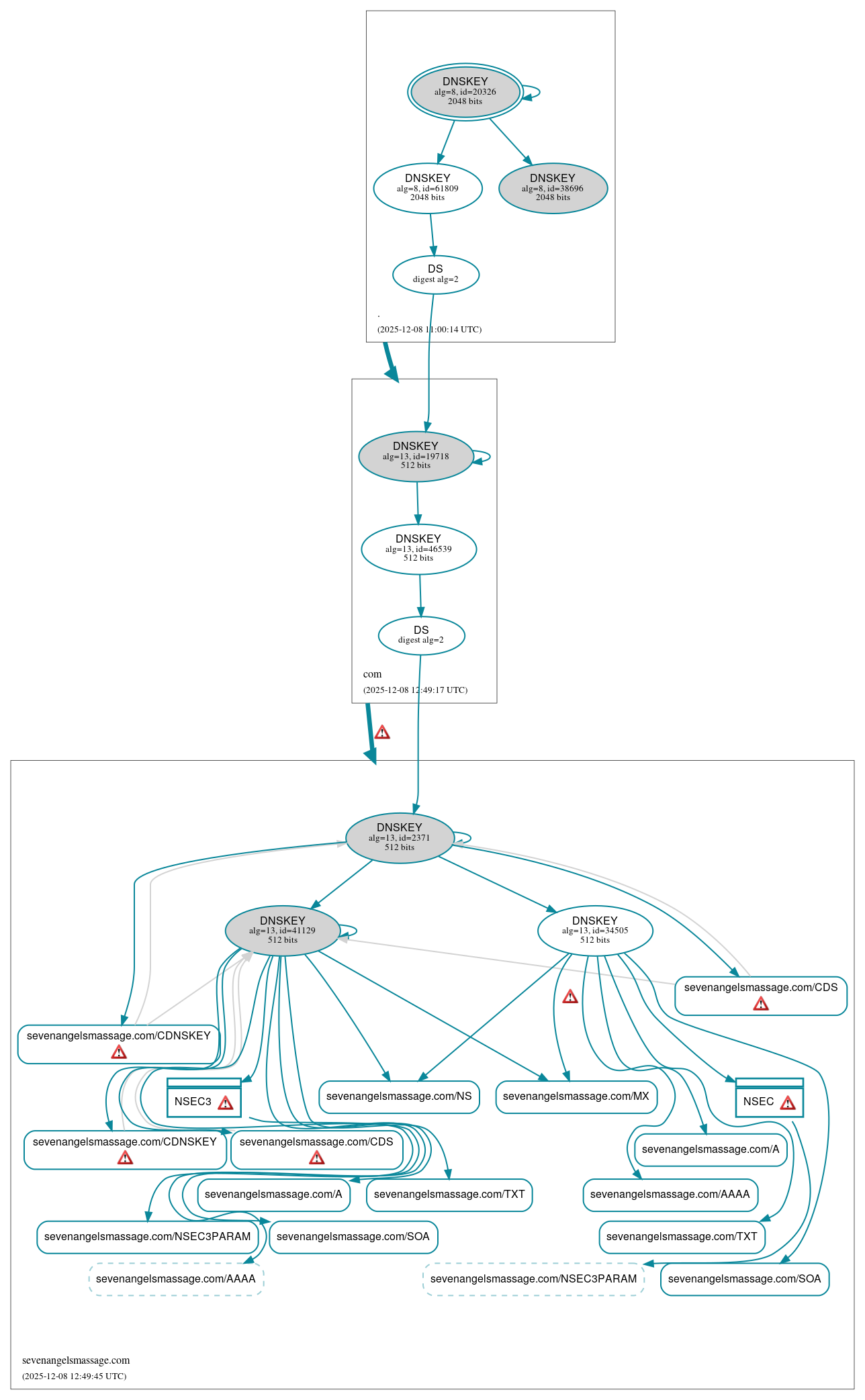
I checked with DNSViz.net and I got these results, what are these errors and how do I fix them? My domain is sevenangelsmassage.com.
Please stop posting more screenshots (I’ve already removed seven). You already have shared the link.
You can fix this by following the instructions. It looks like you did not even do the first few steps.
Stay secure,
Peter
1 Like
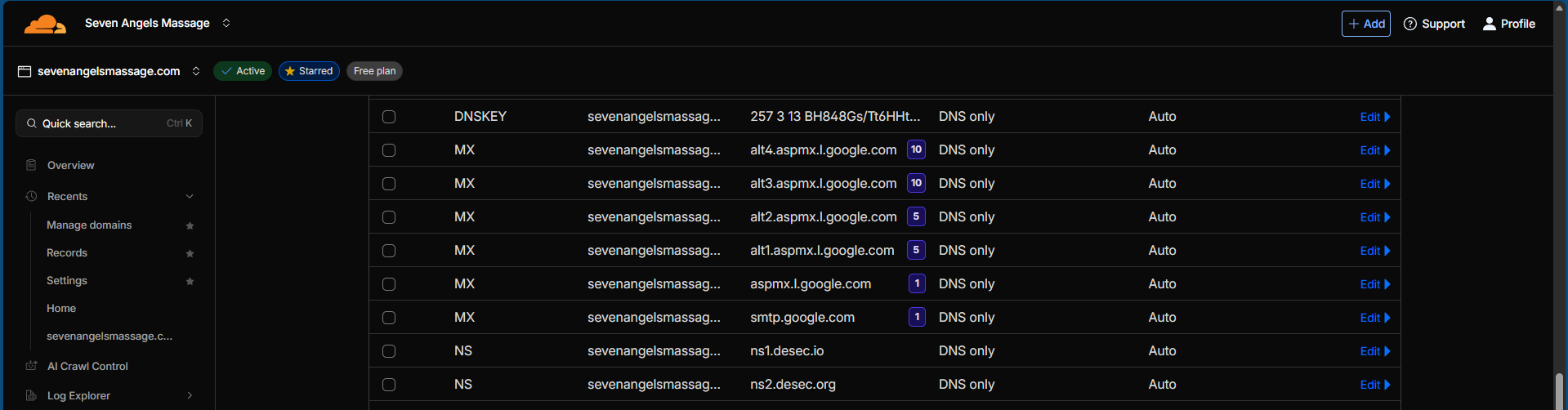
Sorry about that, I already have the DNSKEY records of deSEC into Cloudflare and the NS records. I also did the same from Cloudflare into deSEC, I will show below with another screenshot.
*Edit: Seems like I’m limited to a few posts as new member here, that’s all I can share for today.
Hi, is there no DNSKEY record type available to add on deSEC, or am I missing it?
Hi pd8,
Thanks for your message, and welcome to deSEC!
The type field in the web interface has drop-down options, but you can also simply type “DNSKEY” into it.
Does that help?
Stay secure,
Peter
1 Like
Hi peter, how does one obtain the ZSK (256) DNSKEY from deSEC, to give to the other provider? In the setup instructions only the KSK (257) is shown and running a `dig dnskey … @ns1.desec.io only returns the 257.
Thanks.
Hi Peter, yes worked by manually typing it. Thanks.
If you’re also talking about multi-signer DNSSEC, based on what I learned deSEC is using a CSK, it both acts as ZSK and KSK. So use same record for your ZSK from the KSK, you just change 257 to 256.
Hello peter,
By following this introduction dnsviz will still return errors and warnings because desec unexpectedly auto add a CDS record using sha512, my domain is znn.ee and you could find detailed info at DeSEC automatically add unexpected CDS record - #2 by cjydev
Thank you
That’s a DNSviz problem (and not our bug); see: How-to sort out a problem related to the RFC 7344, Sec. 3 & Sec. 5. - #2 by peter
The IETF recently has approved a document (soon RFC) that clarifies that a digest type mismatch between CDS and DS records is fine. It says:
The parent may apply local policy in determining whether the requested update is consistent or not with the status quo
As an example of local policy, the parent may restrict the choice of hash digest types used when publishing a DS RRset (notwithstanding the requirements specified in [DS-IANA]). (The set of keys referenced in the DS RRset is not up to local policy. Only if all keys from the CDS/CDNSKEY RRsets are included, the DS RRset is considered consistent.)
In other words, the lack of digest type 4 (SHA-512) in the DS RRset is not an inconsistency in the protocol sense. I hope DNSviz will update their output once this document is an RFC.
Stay secure,
Peter
2 Likes
Very interesting!
However, if my current DNS provider (Bunny) does not support DNSKEY records (they currently don’t, but have it on their roadmap) I cannot use this procedure and have to go for the insecure transfer?
Hi rob,
That’s correct.
Stay secure,
Peter
2 Likes