OVH DNSSEC setup for .top (2026)

Follow-up of 2025 topic: Managed DNS Hosting - deSEC Community

Hi All,

I recently registered a `.top` domain at OVH, and have migrated my DNS to deSEC.
The last thing I’m missing is the DNSSEC config.

I ran the DNSSEC analyzer tool https://dnssec-analyzer.verisignlabs.com/.
The only red mark is `No DS records found for mydomain.top in the top zone`.

This indicates I have to manually fill in the DS Record at OVH.

Current issue: DNSSEC algo mismatch

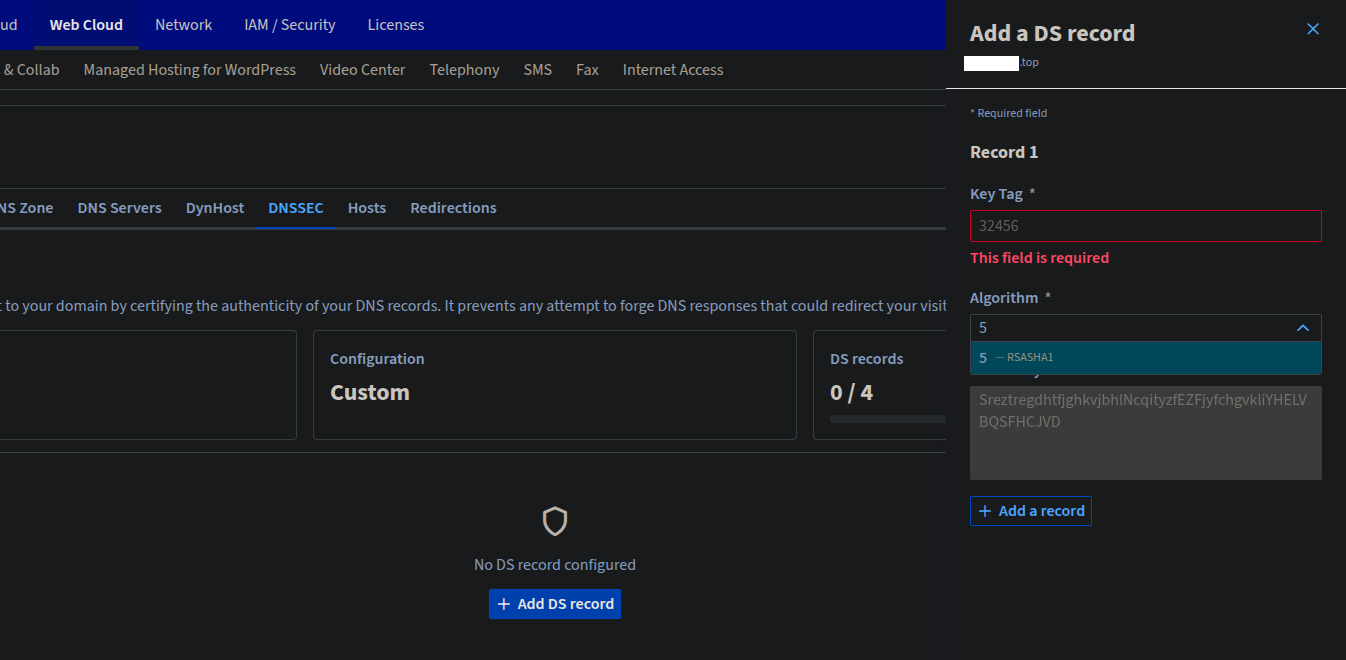
On the one hand, OVH proposes to register the `DS Record` using the algorithm `5 - RSASHA1` (only one option).

In the other hand, deSEC offers DS + DNSKEY Format with Algorithm `13 - ECDSAP256-SHA256`.

I tried; at the time of writing, OVH won’t accept deSEC provided key/tag/flag.

How to solve this situation?

  • Can deSEC provide a DS Format using algo 5 ? (less robust then algo 13 I assume)
  • Should I write to OVH to accept a DS record with algo 13? (stakes are low I think)

I’ve hear OVH is slow to adopt new standard. What middle ground do we have here?

How do other people using OVH as registrar do do have a valid DNSSEC config?


Here is a screenshot of the OVH add `DS Record` popup (it received comments in the past):

Thanks
~lila

It’s too bad that they apparently don’t offer more hash algorithms.

However the DS hash is derived from the DNSKEY record, so in theory it should be possible to calculate an RSASHA1 DS record given a DNSKEY. Unfortunately I don’t know any tools that might help do this calculation :frowning:

Is there an alternative to enter the DNSKEY instead of a DS record at OVH? That might let OVH do the calculation for you.

BTW: I’m not familiar with OVH’s UI but “Add a new entry” sounds more like it wants to add a DS record to the zone of your domain, not to the zone of the parent domain? If so, you are using the wrong tool. The zone at OVH is not being used if you have delegated DNS to deSEC. And the chain of trust requires setting the value in the parent zone.

HTH
fiwswe

1 Like

You may want to read up on OVH’s help on the subject:
Case 2 - Your domain name is registered with OVHcloud and does not use OVHcloud DNS servers

fiwswe

1 Like

Hi Lila, fiwswe,

Thanks for your message, and welcome to deSEC! :slight_smile:

Algorithm 5 is about how the domain is signed, not a hash algorithm for computing the DS record. (There’s also a choice for how to compute the DS record, but that’s the “digest algorithms” which are hash mechanism, rather than “signing algorithms” like RSASHA1.)

No. That would require us to use algorithm 5 for signing, but that’s so old that the DNS standards say that one must not do that anymore: Domain Name System Security (DNSSEC) Algorithm Numbers

Based on the link @fiwswe sent, it indeed looks like you’re in the wrong web interface. Can you see if it works when you follow the instructions at Securing your domain name with DNSSEC - OVHcloud Documentation?

Stay secure,
Peter

2 Likes

Note I did find another users reporting similar issues with OVH and .top domain DNSSEC options:
https://community.cloudflare.com/t/dnssec-for-second-zone-with-other-algorithm/636516
https://www.nic.top/DPS_top.pdf lists RSA/SHA-1 (update: outdated), but of course that should only apply to the algorithm used to sign the DS.

$ unbound-host -DvtDS wihi.top
wihi.top has DS record 2371 13 2 BC40BEA344548B79CC094E95FC197D7C3AAC94010F28C69B2A7DDA1AD6D5685D (secure)

which is the case that there are ECDSA P256 SHA256 (13) DS records in the .top zone (with RSA/SHA256 signature), see wihi.top | DNSViz.

… which is algorithm 5. While the document indeed says that, the information is outdated:

$ dig +noall +answer DNSKEY top.
top.			3471	IN	DNSKEY	256 3 8 ...
top.			3471	IN	DNSKEY	257 3 8 ...

… where the number 8 is the algorithm (RSA-SHA256).

Stay secure,
Peter

1 Like

You’re correct, I edited my post. And also found a DS 13 2 record in the .top zone.
If OVH still states something like stated in the previous linked community, this counter example should hopefully be enough to reconsider their statement.

Hi fiwswe, peter, bwb,

Thank you all for your answers. I’m learning more on the subject.

Yes, actually, that’s what I did intuitively. The screenshot of my first post is illustrating the last step of this Case 2, Step 4 help section.
This is the core of my struggle. It seems I can’t satisfy OVH DS Record requirements with deSEC-provided data.

So it seems the issue at hand is not only specific to OVH, but to the combination OVH + .top TLD. Interesting!

As bwb found, a real DS 13 2 record already exists in the .top zone, which proves the registry accepts algorithm 13; making OVH’s constraint the actual blocker.

web API tentative

I also attempted to bypass the web UI limitation using the OVHcloud API (POST /domain/mydomain.top/dsRecord), submitting the DNSKEY directly with algorithm 13. The API returned the same rejection:
BadParametersError: 13 is not supported by registry. This confirms the limitation is not a UI issue but is enforced at the OVH backend level, leaving no workaround on the registrant side except for transferring the domain to a registrar with proper algorithm 13 support.

To be continued…

EDIT: I just opened a support ticket at OVH. Let’s see how they react.

I have algorithm 13 on the list, but no digest type field and they don’t accept the values copied from deSEC, saying key tag is wrong.

It seems different GUI is presented in old version of the OVH manager (and this is the one documented). This one expects Key Tag, has readonly Flag field with value 257, Algorithm drop down with 8, 10, 13-16 and “Public key (encoded in base64)”. The one in beta version of OVH manager has different fields: Key Tag, Algorithm drop down with 8, 10, 13-16 and Public Key field (no longer mentioning base64 but then the shaded sample value is definitely not hexadecimal).

HI @morvael,

Is your TLD .top? or another one? I think OVH will present different options for each TLDs.

Another one. Encoded hexadecimal key to base64 and it fails validation (wants different value of key tag) - but when I removed padding field validator complained it’s not valid base64. So it seems OVH doesn’t really know what it actually wants from users.

Maybe I just killed my domain but I entered key tag from DS record and base64 value from DNSKEY record presented by deSEC and clicked validate - this saved my value without asking !!

Is says it’s now active. Time to validate :slight_smile:

I managed to fiddle with the DS Record form once. The form was accepted by the UI, but I received an email the next day saying the operation failed.

It can’t work if the algo that OVH proposes not do match both TLD requirements and deSEC provided data…

I can only recommend to open a ticket to OVH. Post their answer, if you ever get one.

So far I pass all checks on https://dnssec-analyzer.verisignlabs.com except propagation to tld. But I remember from turning this on at previous domain controller that it takes time. So I guess it’s fine? Crazy that I had to piece together information from two types of records.

And all is green! Maybe this helps anyone who can pick algorithm 13 from the list:

  • use beta version of OVH manager
  • enter “Key Tag” from DS record presented by deSEC
  • enter “Public Key” from DNSKEY record presented by deSEC

https://dnsviz.net now only complains about missing CDS, but I guess I have to wait for deSEC to add it automatically? https://dnssec-analyzer.verisignlabs.com/ is all green.

That’s not a problem, and a bug in DNSviz, see: How to implement multi-signer DNSSEC? - #20 by peter

Stay secure,
Peter

1 Like

thanks @morvael for the tip, but it’s still not working for me and my .top TLD.
I guess it works for you because you have a different TLD.

I tried the Beta OVH manager UI, and I still don’t get more algo choice than before:

I am still waiting on my OVH support ticket.

@peter can we edit the topic title to precise the discussion scope? “ .top TLD “
I don’t see an edit option.

done

Stay secure,
Peter

2 Likes